Short answer
A useful 5S checklist covers sorting tools, assigning fixed positions, marking those positions visibly, cleaning the area, standardizing the layout and reviewing it during audits. In a B2B workshop, visual organization is not just about tidiness. It is about reducing wasted search time, making checks easier and creating a standard that still works during busy maintenance or production work.
Why it matters in real workshops
Maintenance teams often share tools across shifts, machines and urgent jobs. If a tool location is unclear, someone has to search, ask a colleague or interrupt the work. A visual tool wall makes the expected state visible before the delay grows.
The 5S logic behind the topic
A strong 5S tool wall supports Seiton: tools are sorted, positioned and made visible at the point of use. The wall should show where a tool belongs and make it clear when the tool is missing. That is the difference between storage and visual control.
How ShadowGrid5-S supports it
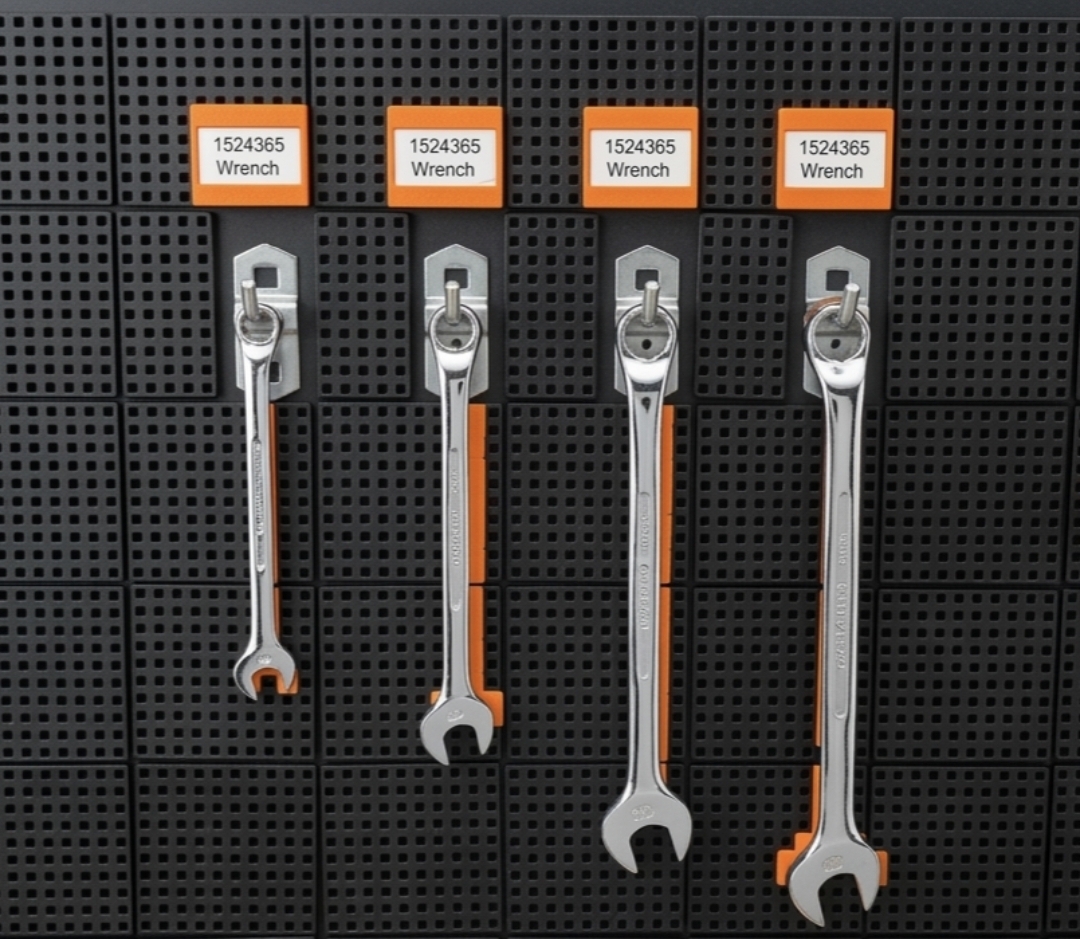
ShadowGrid5-S uses black magnetic modules and orange positioning pins to create visible tool positions on existing perforated or metal tool walls. Existing hooks can remain in use, so the system improves the current wall without paint, stickers or a complete board replacement.
A practical way to start
Start with the tools used most often. Group them by task, machine or workstation. Add modules behind those tools and place orange pins where they create clear missing-tool visibility. Keep the first layout simple, because clarity matters more than filling every square centimeter.
Common mistake to avoid
Many teams try to design the perfect layout in one session. Workshops change. New tools arrive, hooks move and standards improve. A modular magnetic system is useful because the layout can be reviewed after real use and adjusted without damaging the wall.
How to measure improvement carefully
Avoid hard savings promises. Instead, measure search time, interruptions and how often tools are returned incorrectly before and after the change. This makes the improvement visible in a way that is useful for Lean reviews, audits and internal decision-making.
Who benefits most
The approach is especially useful for maintenance teams, production workshops, garages, technical departments, Lean managers and 5S coordinators. Shared tool walls benefit most because every user needs to understand the standard quickly.
Use real visual proof
Real product photos and workshop photos help people understand the system quickly. Show a close-up of the modules, the orange pins, existing hooks that remain in use and a missing-tool example. Those images support both conversion and technical SEO because they clarify the actual product state.
Safety and practical limits
Always check whether the wall surface is suitable for magnetic use and whether modules block moving parts, emergency equipment or required safety markings. If the wall is not magnetic, use a compatible metal carrier or treat the layout as a concept until it has been approved.
Next step
Read the related pages about 5S tool organization, magnetic shadow boards and reducing tool search time. Then decide whether a standard pack is enough or whether a B2B quote request is better for multiple walls or custom quantities.
FAQ
Can I keep using existing hooks?
Yes, ShadowGrid5-S is designed so existing hooks can remain in use while visible tool positions are added.
Is it suitable for 5S audits?
Yes, it supports fixed locations, visual control and faster recognition of missing tools.
Do I need paint or stickers?
No, the modules are magnetic and the orange pins are adjustable.
Can I request a quote first?
Yes, B2B customers can request a quote before ordering.
Does it work on every wall?
It requires a suitable metal or magnetic surface.
Can the layout be changed later?
Yes, modules and pins can be moved when tools, hooks or workstations change.
Is it suitable for maintenance teams?
Yes, shared tool walls in technical services and maintenance departments become easier to check and reset.
Does it help reduce search time?
The system is designed to make tool positions visible and can help teams reduce wasted search time.
Are the orange pins required?
The pins create the visual marker. Use them where they add clear control without making the wall too busy.